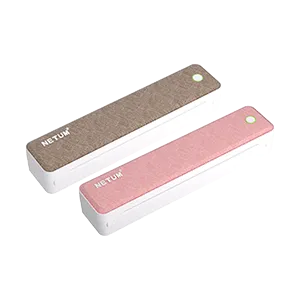
LT-P10 A4 Printer

LT-P10 targets A4 document printing for retail, warehouse, logistics, and mobile office output with Bluetooth connectivity.
LT-P10 A4 Printer

Product Highlights

  • LT-P10 targets A4 document printing workflows that need fast output on site.
  • Covers A4 document printing for contracts, forms, records, and mobile office output.
  • Supports Bluetooth connectivity for phones, computers, or business terminals.

Use Cases

  • Contracts, invoices, and business documents
  • Field service, warehouse, and mobile office output
  • Store, counter, and temporary service point printing

Related Downloads

Mobile app download entry for Netum ScanPrint, providing App Store, Google Play, and Android APK access for supported printing devices.

Version
iOS 1.7.1 / Android 1.7.0
Release Date
2026-05-05
Applicable Category
Printers

Windows and macOS driver download entries from the ScanPrint source page for A401S and LT-D80S printers.

Version
Windows V1.0.9 / macOS V2.0.1
Release Date
2026-01-20
Applicable Category
Printers

Windows and macOS driver download entries from the ScanPrint source page for LT-M30 Pro series printers.

Version
V1.0.0
Release Date
2026-01-20
Applicable Category
Printers

Windows and macOS driver download entries from the ScanPrint source page for XL-P808 series printers.

Version
Windows V1.2.2 / macOS V1.0.7
Release Date
2025-11-05
Applicable Category
Printers

Windows and macOS driver download entries from the ScanPrint source page for C80S series printers.

Version
Windows V1.2.4.5 / macOS V1.2.3
Release Date
2025-09-27
Applicable Category
Printers

Windows, macOS, and Linux driver download entries from the ScanPrint source page for XL-A408, T802, A42, and A41 series printers.

Version
Windows 1.2.1.16 / macOS 1.2.1.13 / Linux
Release Date
2025-07-10
Applicable Category
Printers

Product Documents

No product documents are linked to this model yet.

Online Manuals

No online manuals are linked to this model yet.

Open in browser

Downloads are blocked inside WeChat.

Tap the menu button in the top-right corner.

Choose "Open in Browser" or your default browser option.

Some phones show "Open in browser" instead.